

Brillo de la pantalla
por TLCM photo montage apps

Brillo de la pantalla
Evite la molestia de ajustar el brillo de la pantalla de abrir el control de brillo Android.
La innovación introducida por el Control de Lux consiste en la corrección del error de calibración del sensor de luz durante el uso de control de brillo.
Flux es lo suficientemente inteligente como para ajustar y controlar el brillo de la pantalla según el entorno que se encuentra.
Si usted entra en la sala de la luz del día la aplicación se incrementará automáticamente el brillo de la pantalla para que sea facilmente visibile, mientras que si se mueve en una habitación con poca Flux se atenuará la luz de tu pantalla, incluso por debajo de 0% para que sea cómodo para leer y también para preservar la batería.
La configuración se reduce al mínimo con el fin de garantizar a la sencillez de uso que falta en todos los demás Screen Dimmer o aplicaciones Lux Control / Control de Brillo.
La reducción del consumo de batería está asegurada por el control automático de brillo y configurando el brillo mínimo bajo cero es posible aumentar aún más los ahorros, especialmente en dispositivos de Samsung.
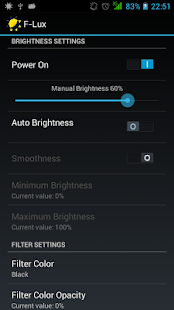
CARACTERISTICAS - Gestión automática del control de brillo Screeen - Selector de brillo manual para calibrar el nivel de brillo de la pantalla apropiada - Fade suavidad Personalizable para la calibración de retroiluminación - Subzero brillo de la pantalla para una visualización dimmer modo nocturno y el ahorro de batería - Color Dim y pantalla a color más tenue para las personas con problemas en los ojos y sensibilidad a la luz del día - Configuración sencilla: descargar Flux y disfrutar de ella es necesaria ninguna configuración (la configuración por defecto es suficiente) y la aplicación aprende automáticamente - La batería eficiente, de hecho, con pantalla Flux dimmer puede ahorrar alrededor del 15% de la batería - No hay anuncios o molestias AJUSTES Suavidad: activar esta opción cambiará el dulce brillo de la pantalla Brillo mínimo (en relación con el lux percibida en el entorno): ajusta el brillo mínimo de la pantalla para el controlador de control de lux, si establece este valor bajo cero Flux se aplicará un filtro para reducir aún más el brillo de la pantalla Brillo máximo: ajusta el brillo máximo de la pantalla Se aplica cuando el brillo ir bajo cero el color tenue: Dimmer color Filtro de color: elegir el color del filtro que aplicar cuando Flux está activo Filtro de color Opacidad: ajusta el nivel de opacidad de filtro Aplicación de control lux Flux: cuando se descubre que usted nunca va a vivir sin ella.
Productivity Tools
Boost your productivity with powerful tools and features.
Learning Tools
Enhance your learning experience with interactive features.
Smart Home
Control and monitor your home with smart features.
Mira Brillo de la pantalla en accion

Lo que dicen nuestros usuarios
No confies solo en nuestra palabra. Esto es lo que nuestros usuarios opinan de esta aplicacion Android.
"Very inconsistent, no manual curve adjustment, blocks apps like google play store"
"Used to love it, but currently incompatible with the playstore or android 10. I'm not sure this can be helped, due to the security of android. Unfortunately at night the default android night app is not strong enough for me. The options of this app with overlay are still unpresidented to me. Truly hope the issues get fixed. I really love this app and it was worth every penny for the years I used it."
"Have restart Apps auto function everytime before it works"
"Does the job"
"Must have for any oled displays to prevent burn images from developing. This app has the potential for greatness but still missing key features to justify the steep price- for example: give the user to ability to calibrate the lux settings at anytime, the ability to exempt any app from dimming (like YouTube or watching videos), and widget options. Update: seems like the app is no longer automatically dimming based on the light settings. Working great for a few hours. Note 8 on Pie"
"ok"
"app performs consistently. i found that there are issues when other apps have pop ups, for example when u add card info to chik fil a or google pay. you are unavle to click on, select or type anything in pop up boxes, and the screem goes dim during these times as if this screen brightness app has shut down or something. i notice it a few time and i thought it was my phone at first, but something told me to try turning off this app. once i turned off this app i no longer had the issue."
"Good"
"Excellent application for brightness management. In my case the screen was dimming too hard in auto mode and the system was not saving corectly the minimmum brightness setting.Thanks!"
"I'm disappointed. The auto brightness has no setting that works consistently. I've tried every setting I can . The manual control is no better than Android's."
Obtener la aplicacion hoy

Disponible para Android 8.0 y superior
Pregunta a la IA sobre esta app
Obtener respuestas instantaneas sobre funciones, consejos y mas.